
Swingmail
Giving communication a clear mobile structure.
A mobile communication experience bringing important email and social messages into connected conversations.
- My role
- UX & visual design
- Period
- Earlier product work
- Designed for
- Email & social-message users
AI leadership noteTurn a thread into a draft with traceable sources
Original approach
The design brings email and social messages into a shared conversation view, with account and channel choices available when composing a reply.
What could change today
Summarize a conversation across connected accounts and cite the message behind each commitment. Draft a response for the account owner to edit and send.
Workflow excerpt. The numbered steps show the same part of the journey in each version. The full project includes work beyond this comparison.
Original workflow
- Scan the list
- Open the content
- Respond or act
- Return with context
Proposed workflow with AI
- Scan threads ranked by commitments that need attention.
- Open the cited messages in the correct account.
- Edit the suggested reply and verify its recipients.
- Return to the thread with the sent reply in context.
How to test the change
Test conflicting dates, forwarded instructions and two contacts with the same name. Check account boundaries and recipient selection.
01 / Customer & problem
The need behind the work.
Who needed this.
People managing communication need to scan conversations, read focused content and move between related accounts with context intact.
The problem to solve.
Conversations can be split across email and social accounts. People need to find important messages, follow the exchange and reply through the appropriate account without repeatedly switching contexts.
Make the information structure visible through a connected set of mobile screens.
02 / My ownership
Responsibilities.
Designed the interface and supporting visual applications for Swingmail, connecting message, conversation and account states.
The constraint to work through.
Content density and quick scanning pull in different directions. Navigation must support focused reading without fragmenting the conversation.
- Scan the list
- Open the content
- Respond or act
- Return with context
03 / Actions & delivery
How the work came together.
The design brings email and social messages into a shared conversation view, with account and channel choices available when composing a reply.
Repeated navigation and a restrained hierarchy connect the screen sequence.
The broader archive includes identity and promotional applications, showing the relationship between the product and its communication.
04 / Decisions & judgment
What carries through the design.
Design the sequence.
Related states show how users move through communication tasks.
Let content carry the emphasis.
A quiet interface hierarchy leaves room for messages and account information.
The experience in detail
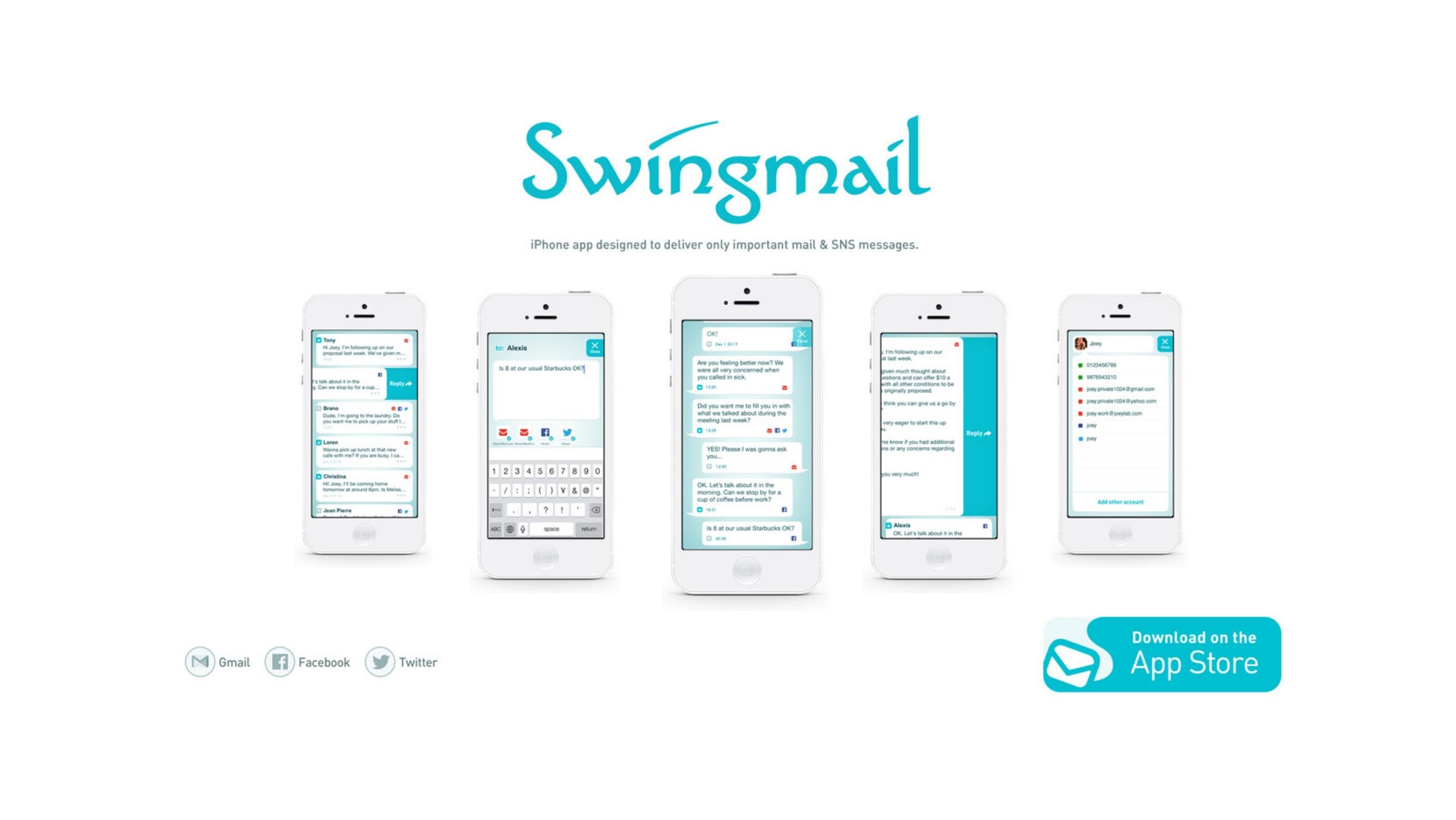
A conversation across services.
The central product idea is continuity: important mail and social messages stay together so the person can read, respond and manage the connected accounts.
Inbox → compose → conversation → reply → account
Inbox, compose and reply states carry the conversation across connected communication services.
The experience in detail
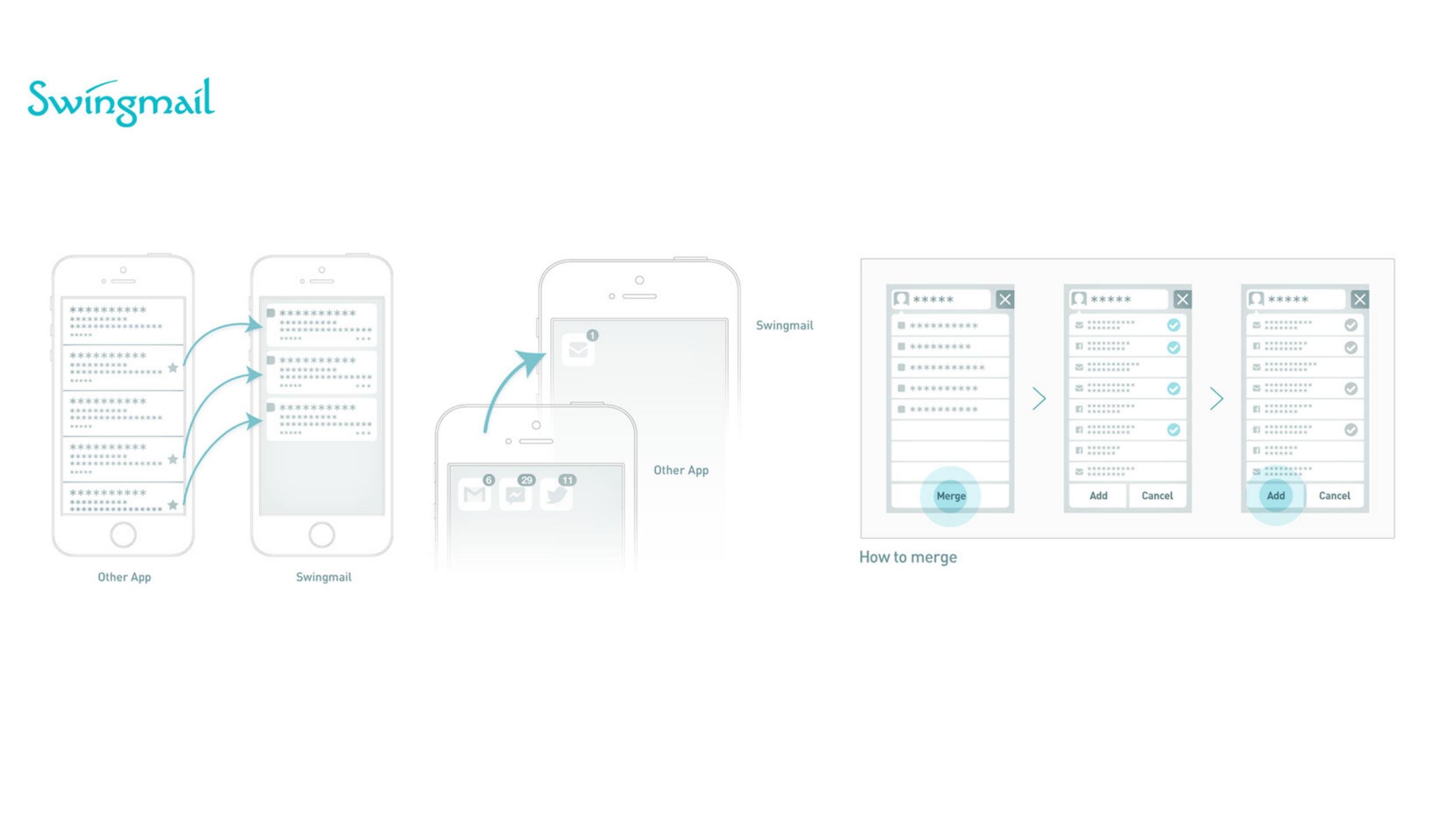
Make consolidation understandable.
Prioritization reduces the inbox to important conversations. The merge flow shows how a person selects and combines the accounts that belong together.
Prioritize → consolidate → merge accounts
The merge flow connects account selection, consolidation and the resulting inbox.
05 / Results & business value
What changed through the work.
A consistent set of mobile interface states and supporting visual applications.
Why it matters.
The interface brings important mail and social messages into a shared conversation structure, connecting message review with account-aware replies.
06 / Reflection
Lessons for future projects.
Judge the communication experience by the transition between states, including how easily someone returns to the list after acting on a message.
Let’s talk about your next chapter.
Exploring Senior Director, Head of Design and VP opportunities.