
7-Eleven · Innovation / R&D
Sierra: knowing when the store needs attention.
Connected-device monitoring and conversational troubleshooting for store associates. The prototype uses the SAIRA identity.
- My role
- UX Product Design Lead · R&D Innovation Lab
- Period
- Jan 2019 – Sep 2019
- Designed for
- Store associates
AI leadership noteLet associates ask what changed in the store
Original approach
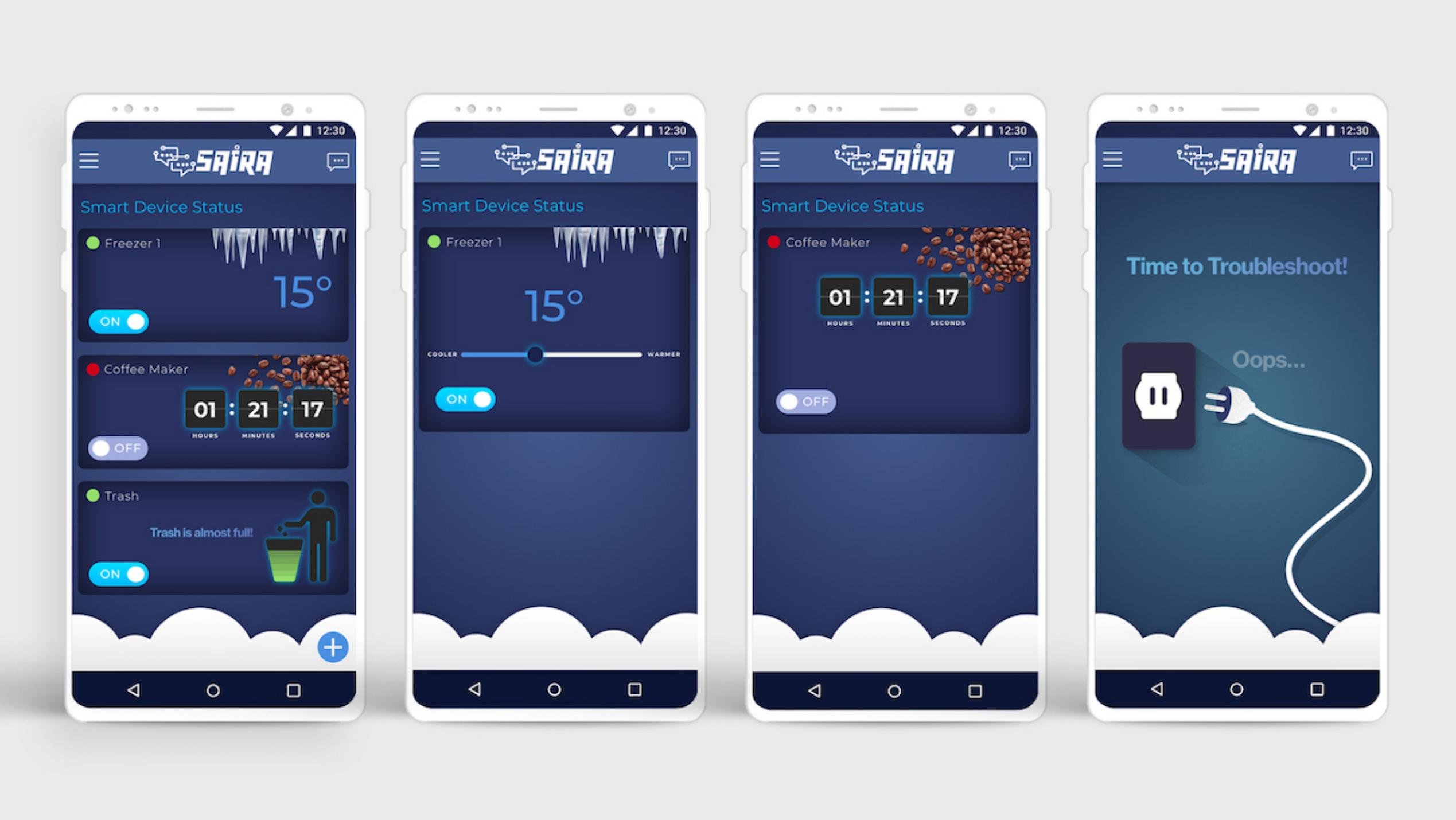
The status view brings freezer temperature, coffee-maker state and trash capacity together. Device detail provides controls, while a conversational flow narrows the equipment and symptom before presenting illustrated troubleshooting guidance.
What could change today
Pair the latest bin reading or freezer alert with the equipment’s service guide. Show the reading and its age beside the proposed next step. Require an associate to confirm any device command.
Workflow excerpt. The numbered steps show the same part of the journey in each version. The full project includes work beyond this comparison.
Original workflow
- Check store status
- Identify the issue
- Inspect the device
- Follow guided help
Proposed workflow with AI
- Review the store’s sensor readings and alert freshness.
- Identify the device and ask what changed.
- Check the reading against that device’s operating guidance.
- Follow approved steps, then verify recovery or escalate.
How to test the change
Disconnect a sensor and replay a stale reading. Check whether the associate sees the uncertainty and can reach the right technician.
01 / Customer & problem
The need behind the work.
Who needed this.
Store associates need to serve customers while knowing which equipment or bins require attention and what action to take.
The problem to solve.
Store associates have customers to serve while refrigerators, coffee makers and trash bins need attention. Repeatedly walking over to check a bin or inspect equipment interrupts that work. When equipment stops working, knowing what to check next is a second problem.
Bring equipment condition and the next useful action into one associate experience. A sensor-enabled trash bin should signal when it needs emptying; equipment guidance should help an associate identify a problem and take the next step.
02 / My ownership
Responsibilities.
Led UX product design within 7-Eleven R&D. This project connects my mobile interaction work to the lab’s broader collaboration across software and connected hardware.
The constraint to work through.
Live readings, connection status and troubleshooting must remain understandable during a busy shift. A quiet device cannot automatically mean a healthy device.
- Check store status
- Identify the issue
- Inspect the device
- Follow guided help
03 / Actions & delivery
How the work came together.
Within 7-Eleven’s innovation department, we developed the experience under its own SAIRA identity. The work connects physical store equipment with an associate-facing mobile interface.
The status view brings freezer temperature, coffee-maker state and trash capacity together. Device detail provides controls, while a conversational flow narrows the equipment and symptom before presenting illustrated troubleshooting guidance.
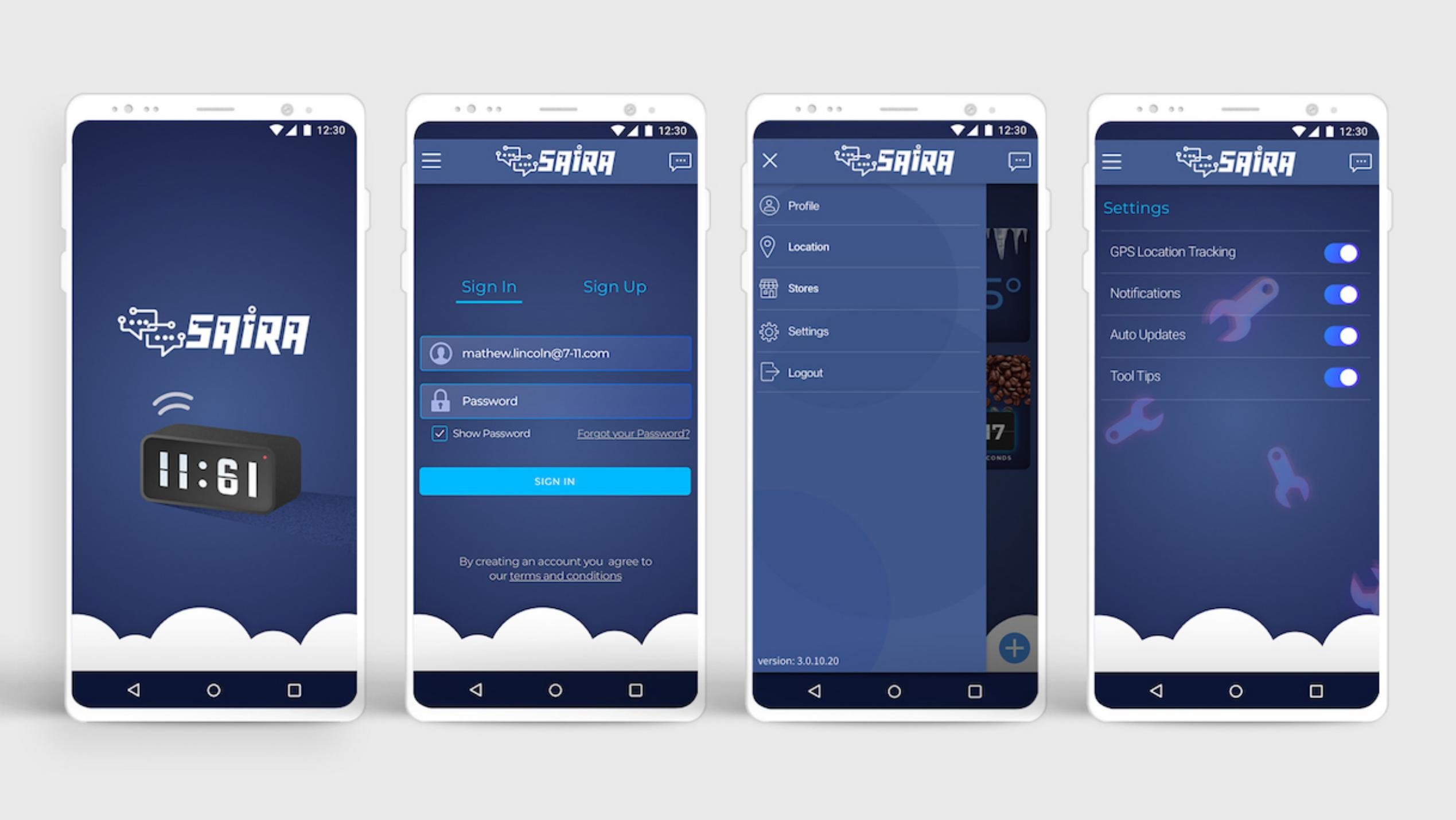
The design includes access, store navigation, notification settings and an offline state. Those supporting states matter because an equipment-monitoring experience depends on knowing which store is being monitored and whether the information is available.
Sierra was the associate-facing part of the 7-Eleven autonomous-store effort. While shoppers experienced the store through shelves, cameras and even scent, associates needed a way to see which equipment required attention.
04 / Decisions & judgment
What carries through the design.
Make the reason to act explicit.
“Trash is almost full” gives the associate a specific reason to check the bin. The sensor-to-notification concept addresses the repeated checking described in the store workflow.
Keep guidance in the equipment context.
The freezer flow asks which symptom applies before giving a concrete instruction. It avoids making the associate navigate an unrelated support experience.
Treat live status as a dependency.
Notification preferences and offline messaging belong in the core experience. An unavailable connection cannot imply that equipment is healthy.
- Enter the store
- Introduce a coffee or bakery scent
- Check exposure and residue
The experience in detail
Know what needs attention.
An associate checks one store view instead of walking to each device. Freezer temperature, coffee-maker status and trash capacity sit together.
01 / Sign in
Enter the associate experience.
02 / Find the store
Store navigation provides the operating context.
03 / Check device status
See equipment state and the “Trash is almost full” indicator.
Sense
The bin reports capacity.
Notify
The associate knows when attention is needed.
Act
Empty the bin.
Monitor
Follow the next sensor status.
Smart trash: sensor state → associate notification → empty the bin → monitor the next status. The design replaces repeated checking with a specific reason to act.
The experience in detail
From an equipment issue to a useful next step.
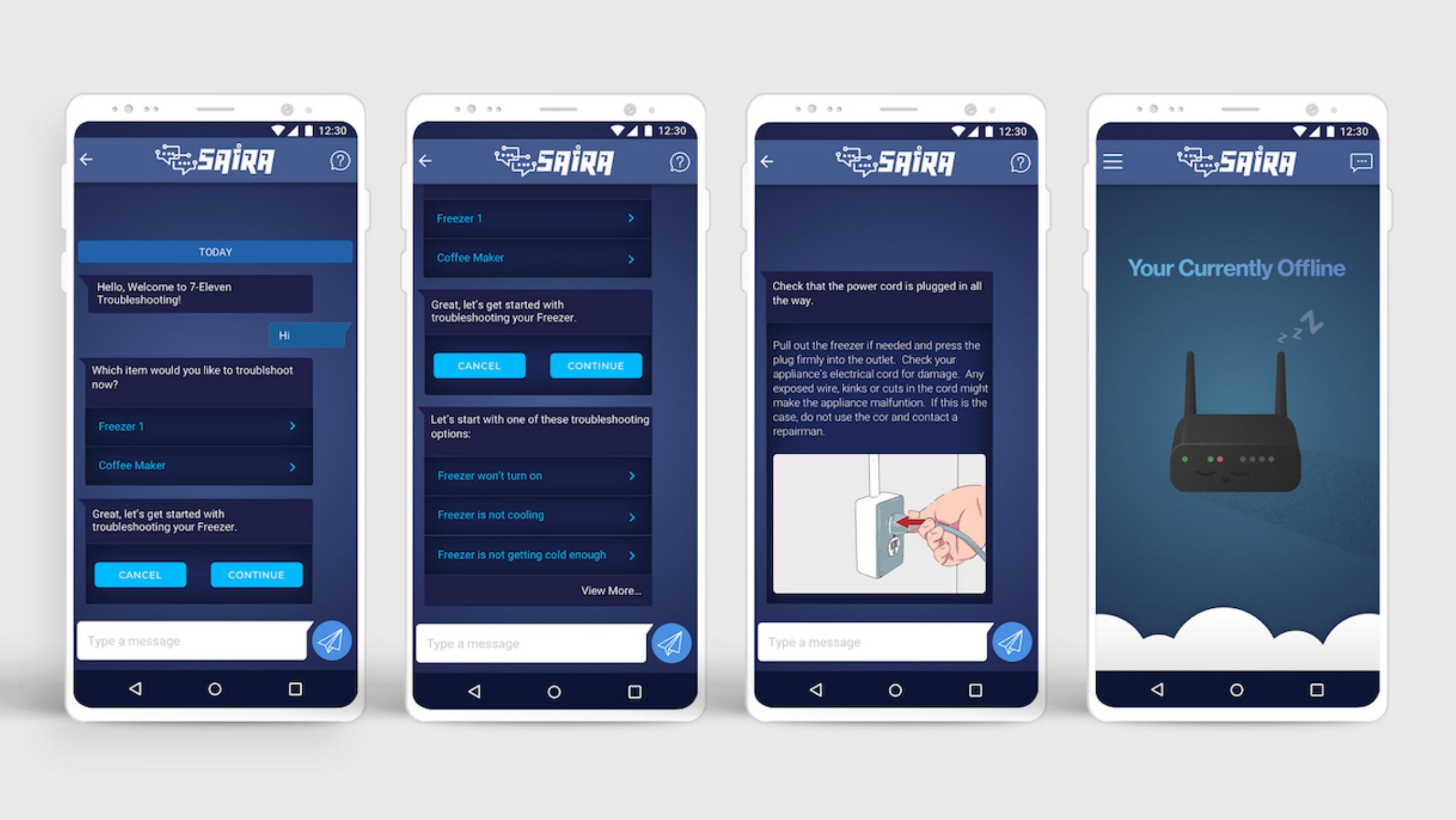
The freezer journey moves from a device reading into a conversational diagnostic flow. The guidance names the equipment and narrows the symptom before presenting instructions.
01 / Inspect the freezer
Review temperature and the available controls.
02 / Choose the equipment
Start guided help for Freezer 1.
03 / Identify the symptom
Choose whether the freezer will not turn on or is not cooling.
04 / Follow the guidance
Read a concrete instruction with an explanatory illustration.
Related interaction states
Keep the operating state understandable.
Equipment controls, notification preferences and loss of connectivity are part of the same service experience.
Coffee-maker status
A timer and power state make the device condition visible.
Notification preferences
The associate can manage notifications and supporting settings.
Connection lost
A dedicated offline view communicates that live information is unavailable.
05 / Results & business value
What changed through the work.
A connected store-monitoring concept that joins equipment status, smart-trash signals and guided troubleshooting. The screens demonstrate the path from awareness to action, including notification preferences and a loss-of-connection state.
Why it matters.
The connected design targets avoidable inspection trips and gives associates equipment-specific guidance. Smart-trash notifications connect a sensor reading to a practical store task.
06 / Reflection
Lessons for future projects.
Carry the awareness-to-action pattern into other operational tools: surface the condition, explain why it matters and keep the next step close.
Let’s talk about your next chapter.
Exploring Senior Director, Head of Design and VP opportunities.